
From Pain Point to Product Plan: How to Use a Solution Canvas and a Mini Business Plan
August 27, 2026 · 9 min read
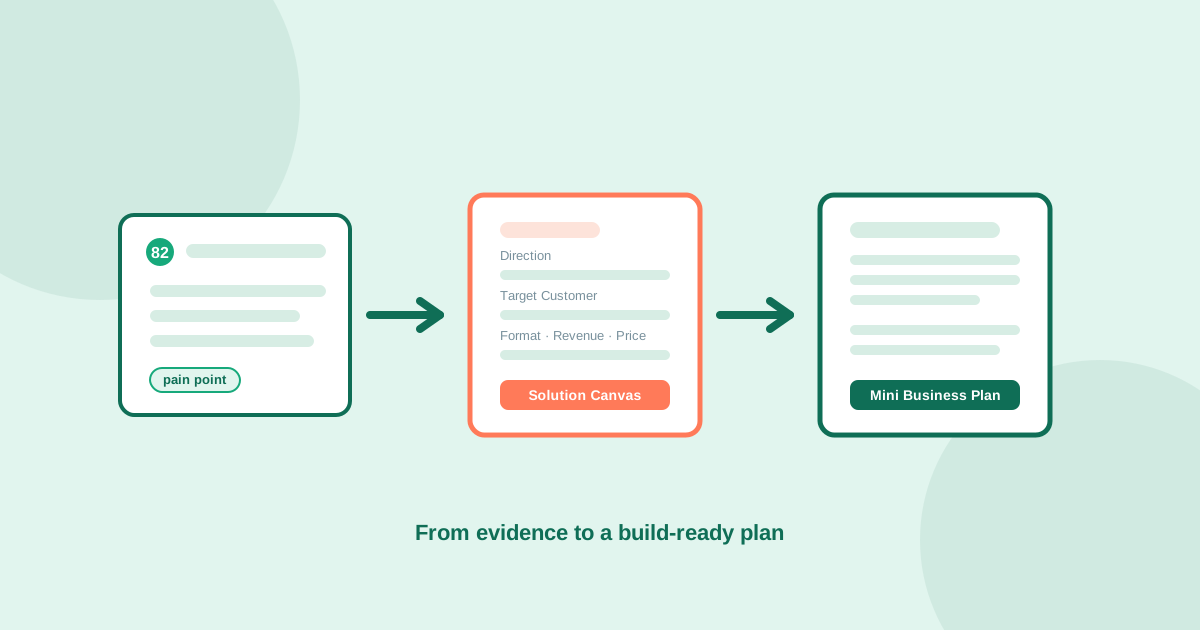
Most pain-point research ends the same way: a ranked list of complaints, a handful of strong quotes, an opportunity score, and a founder staring at all of it wondering what happens next. Evidence that a problem is real is not the same thing as a plan to build something for it. That gap, between confirming a pain point and deciding exactly what to build, who to build it for, and what to do in the first 30 days, is where a lot of validated ideas quietly stall.
This guide walks through the step most validation guides skip: turning a ranked pain point into a Solution Canvas that pins down a concrete product direction, and a Mini Business Plan that pressure-tests whether that direction is worth a real commitment. Both are structured outputs inside UserConcern, built directly on top of a pain point's own evidence, and the structure behind them is useful even if you build the equivalent by hand.
Why validated pain points still stall at "now what"
A ranked pain point tells you a problem is real, recurring, and painful enough that people complain about it in public across independent sources. It does not tell you what to build. The same validated pain, freelancers losing money to late-paying clients, could become a SaaS invoicing tool, a browser extension, a done-for-you service, a template pack, or a newsletter teaching better contract terms. Each of those is a different bet, with a different cost to build, a different revenue model, and a different first customer. Skipping straight from "this pain is real" to "I'll build a SaaS app" is exactly how founders end up building the most expensive possible answer to a problem that might have had a cheaper one.
The Solution Canvas: pinning down a concrete direction
A Solution Canvas takes a validated pain point, its opportunity score, target audience and market size, and forces a specific, narrow answer instead of a vague one. In UserConcern, generating one from a pain point produces nine concrete fields: a one-sentence Direction naming the single clearest product to pursue, a Unique Angle stating what makes it different from what already exists, a specific Target Customer described by age, situation and pain moment rather than a demographic label, and a Product Format chosen from a fixed set of concrete options, SaaS tool, mobile app, template or spreadsheet, online course, community or membership, newsletter, physical product, an improvement to an existing product, or a hybrid of digital and physical.
The canvas then adds a Revenue Model (subscription, one-time, freemium or marketplace), a Price Anchor with reasoning behind the number, three concrete First 30 Days actions aimed at validating the direction and landing a first customer, an Image Prompt for visualizing the product, and a closing Motivation line. When the chosen format is a physical product or a product improvement, the canvas adds a physical-details block covering suggested materials, the best-fit sales channel among Amazon, Etsy, Shopify or wholesale, a manufacturing approach, packaging direction, and a supplier hint. The value of this structure is less about any single field and more about the constraint: you cannot fill it out honestly while still being vague about who the customer is or how the product makes money.
The Mini Business Plan: pressure-testing the direction
Once a Solution Canvas has committed to a direction, a Mini Business Plan tests whether that direction survives being written down as an actual business. It takes the pain point, the canvas's chosen direction, the target customer, and the market size, and produces a structured one-pager: a two-sentence Executive Summary stating what you are building and why now, a description of The Problem naming who feels it, how often, and how intensely, and Your Solution written in plain language rather than pitch-deck phrasing.
From there it covers the Target Market and size estimate, a Revenue Model with an expected price and a stated path to a first meaningful recurring-revenue milestone, and a Competitive Advantage section naming specifically what existing options are missing that this direction addresses. The plan closes with a week-by-week 30-Day Action Plan, three Success Metrics to track over the first 90 days, and a Motivational Close. None of this replaces a full business plan for investors. It exists to answer one narrower question fast: does this direction, written out as a real business with a real price and a real competitor gap, still hold up, or does it fall apart once you have to be specific about revenue and competition instead of just describing the pain?
A worked example
Take a validated pain point around freelancers losing money to inconsistent, late-paying clients, cross-confirmed across Reddit, review sites and YouTube comments with an opportunity score reflecting strong pain and moderate competition. A Solution Canvas built from that pain point might land on a narrow direction: a SaaS tool, not a course or a newsletter, specifically for solo freelancers juggling five or more clients, with a unique angle around automated payment-milestone tracking rather than generic invoicing. The target customer is not "freelancers" broadly but a specific person: a mid-career freelance designer managing four to six active clients who currently tracks payments in a spreadsheet and has been burned by a late payment in the last six months.
The Mini Business Plan built on top of that canvas then has to answer harder questions in specific terms: what price does a solo freelancer actually pay for this, what does the first 30 days of getting ten real users look like, and which existing invoicing tools does this beat, and why. If the plan cannot name a believable price, a believable first-30-days path to real users, and a specific reason existing tools structurally cannot serve this segment, that is useful information too, it means the direction chosen in the canvas needs revisiting, not that the underlying pain point was wrong.
From plan to first build sprint
A Solution Canvas and Mini Business Plan earn an idea a build sprint, not a company. Once both hold up, the natural next step is the thinnest possible version of the First 30 Days actions from the canvas: a landing page using the plan's own problem language, outreach to the specific target customer described in the canvas rather than a broad audience, and a prototype scoped to the single product format the canvas committed to, not a broader version that tries to hedge across formats. The whole point of forcing specificity this early is that the first real build decision, what to build, for whom, at what price, gets made with evidence already in hand instead of being guessed at the moment code starts getting written.
Frequently asked questions
What is a Solution Canvas?
A Solution Canvas turns a validated pain point into a concrete product direction. It specifies a one-sentence direction, a unique angle versus existing options, a specific target customer, a product format chosen from a fixed list (SaaS tool, mobile app, template, course, community, newsletter, physical product, product improvement, or hybrid), a revenue model, a price anchor, three first-30-days actions, and a motivational close, with extra fields for materials and sales channel when the format is physical.
What is a Mini Business Plan?
A Mini Business Plan is a one-page structured plan built on top of a Solution Canvas's chosen direction. It covers an executive summary, the specific problem and who feels it, the solution in plain language, target market and size, revenue model and pricing, competitive advantage, a week-by-week 30-day action plan, and three success metrics to track over the first 90 days.
Do I need a Solution Canvas before a Mini Business Plan?
Yes, in practice the plan builds on the canvas. The canvas commits to a specific direction, target customer and product format first; the plan then pressure-tests whether that specific direction survives being written out as a real business with a real price and a named competitive gap. Trying to write a business plan before committing to a direction usually produces something too vague to act on.
Can I build a Solution Canvas and Mini Business Plan manually without a tool?
Yes. The structure is what matters: force a one-sentence product direction, a specific target customer (not a demographic), a single product format, a revenue model with a real price, and three concrete actions for the first 30 days, then pressure-test that direction with a one-page plan covering market size, competitive advantage and 90-day success metrics. UserConcern generates both automatically from a pain point's own evidence on the Pro plan, but the same discipline works done by hand.
What happens if the Mini Business Plan doesn't hold up?
That is a useful outcome, not a failure. If the plan cannot name a believable price, a believable path to real early users, or a specific reason existing options fall short, it usually means the direction chosen in the Solution Canvas needs revisiting, not that the underlying validated pain point was wrong. Go back to the canvas, choose a different product format or narrower target customer, and pressure-test again before committing build time.
More articles
 Strategy
How to Use Competitor Analysis to Find a Market Gap (Not Just a Feature List)
Most competitor analysis produces a feature comparison table nobody acts on. Here's how to run competitor analysis that surfaces an actual gap, an underserved segment or complaint incumbents structurally can't fix, using public reviews and complaints instead of marketing pages.
Read article → Strategy
How to Validate a Local Service Business Idea Before You Quit Your Job
Local service businesses, cleaning, tutoring, pet sitting, home repair, live or die on demand in a specific area, not global search volume. Here is how to check real local demand and unmet complaints before you invest savings or notice.
Read article →